







How to Build the Perfect Business Listing for Local SEO Success
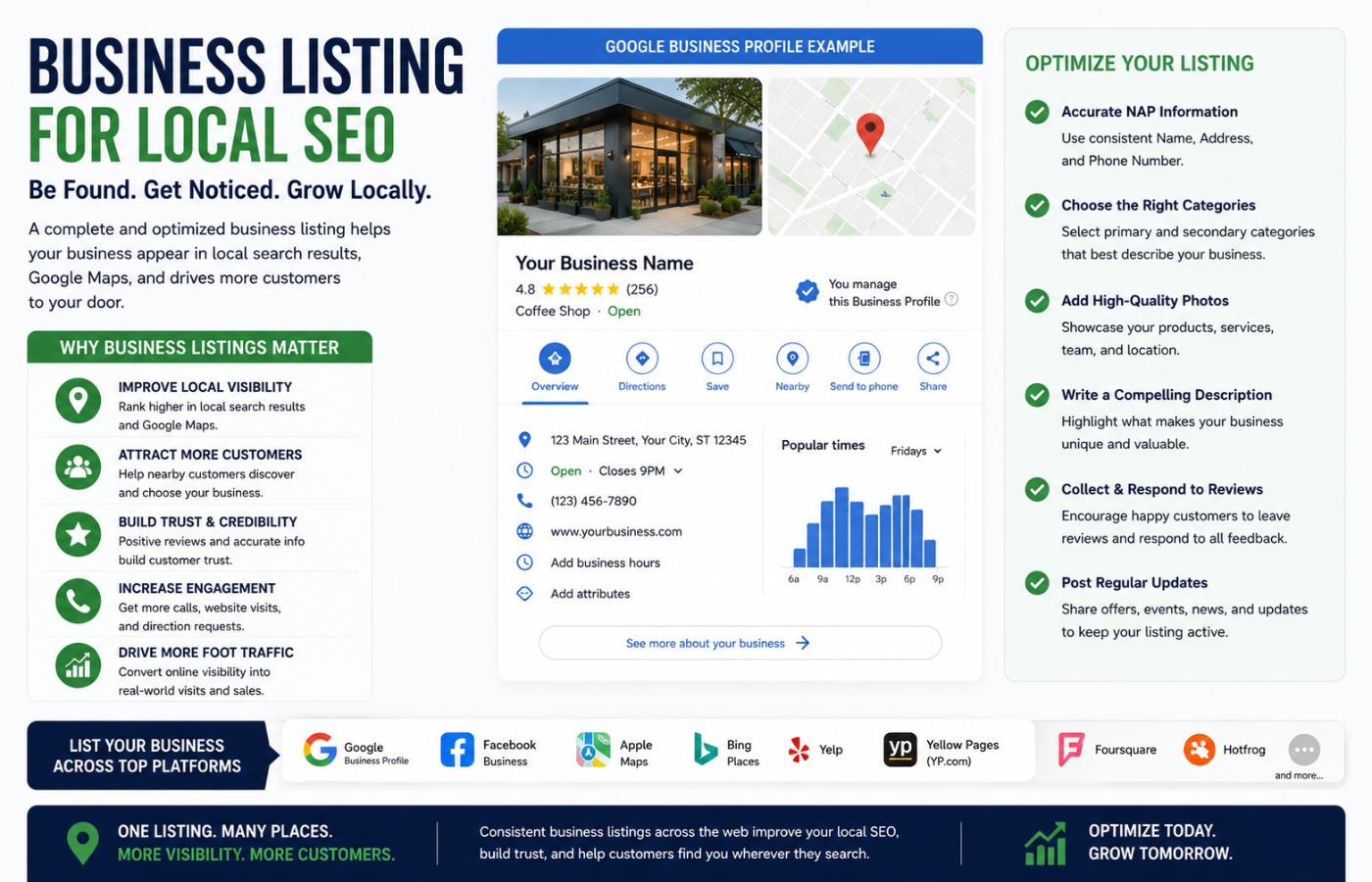
A business listing for local SEO is the cornerstone of any successful local search strategy. It is the online entry that provides essential information about your business—name, address, phone number, and website—across directories like Google Business Profile, Yelp, and Apple Maps. These Local SEO citations help search engines verify your business information and strengthen your online credibility. When you create complete and accurate business listings for local SEO, you help search engines trust your information, which directly improves your visibility in local search results.
Why Your Business Listing Matters for Local SEO
Your business listing is often the first interaction potential customers have with your brand. In fact, 97% of consumers use online media to research local businesses before choosing where to shop or eat . A well-optimised listing builds trust, increases visibility in the Google Local Pack, and drives more phone calls and foot traffic . Conversely, incorrect or inconsistent information can confuse both customers and search engines, costing you valuable leads .
How to Build the Perfect Business Listing for Local SEO
Creating the perfect business listing for local SEO requires attention to detail across multiple platforms and ongoing maintenance. Follow these steps to build a listing that drives results:
1. Claim and Verify Your Google Business Profile
Your Google Business Profile (GBP) is the most important business listing for local SEO, as it appears on Google Search and Maps . Visit google.com/business, create or claim your listing, and complete the verification process. This step ensures you control the information customers see when they search for your business .
2. Ensure NAP Consistency Across All Platforms
Your Name, Address, and Phone Number (NAP) must be exactly the same across every directory, your website, and social media profiles . Even small differences like “St” vs “Street” can confuse search engines and hurt your rankings . Create a master document with your standardised NAP and use it everywhere .
3. Select the Right Categories
Choose categories that accurately describe your business, starting with the most specific option available . For example, “Italian Restaurant” is better than just “Restaurant.” Add relevant secondary categories to capture a broader range of searches .
4. Write a Compelling Business Description
Your description should highlight what makes your business unique, include local keywords naturally, and focus on customer benefits rather than keyword stuffing . Think of it as an elevator pitch that convinces potential customers to choose you .
5. Add High-Quality Images and Videos
Listings with photos receive twice the click-through rates . Include your logo, storefront or office exterior, interior shots, product photos, and team images . Businesses with 100+ photos get 520% more calls than those with fewer than 10 .
6. Encourage and Respond to Reviews
Reviews are a major local ranking factor . Ask satisfied customers to leave reviews on your Google Business Profile and other platforms . Respond to every review—positive and negative—within 24 hours to show you value customer feedback .
7. Submit to Other Key Directories
Beyond Google, ensure your business is listed on:
-
Bing Places for Bing search visibility
-
Yelp (especially for restaurants and service providers)
-
Apple Maps via Apple Business Register
-
Facebook Business for social proof
-
Industry-specific directories like TripAdvisor, Houzz, or Avvo
8. Add Local Schema Markup to Your Website
LocalBusiness schema markup helps search engines understand your business information and connect your website to your listings . This structured data can also enable rich snippets in search results, increasing click-through rates .
9. Publish Regular Updates
Google rewards active profiles. Use Google Posts to share news, promotions, events, or service updates weekly . This signals to Google that your business is active and engaged .
10. Monitor and Maintain Your Listings Quarterly
Listings decay over time. Run a quarterly citation audit to identify and fix inconsistencies, update holiday hours, and refresh your photos . Tools like BrightLocal or Moz Local can automate this process .
Common Business Listing Mistakes to Avoid
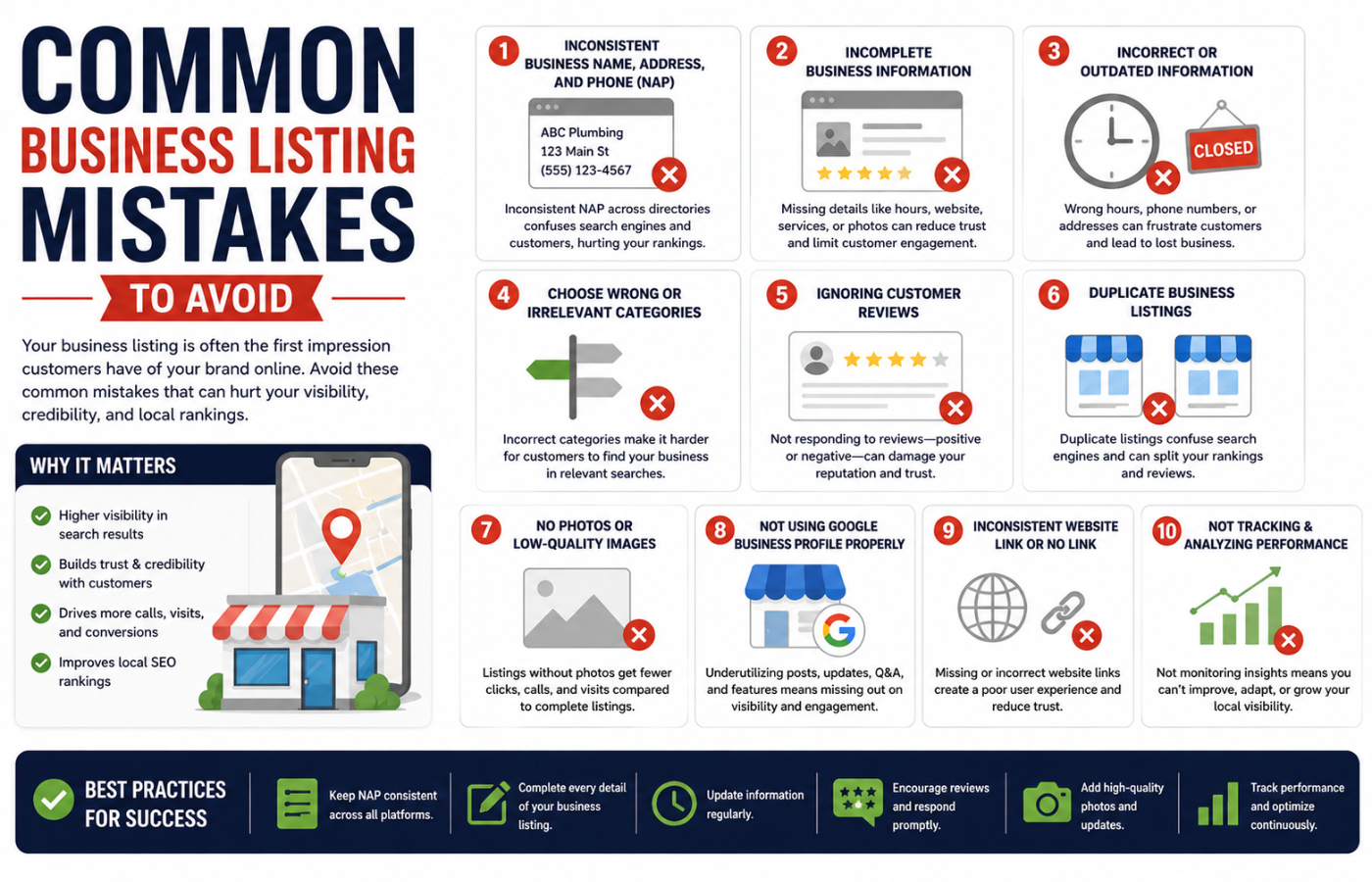
| Mistake | Why It Hurts | Fix |
|---|---|---|
| Inconsistent NAP across directories | Confuses Google, hurts rankings | Use a master document and audit regularly |
| Incomplete Google Business Profile | Less visibility in local pack | Fill every relevant field |
| Ignoring reviews | Damages trust and rankings | Respond to all reviews within 24 hours |
| Using a PO Box as address | Not accepted by Google | Use a real physical address or hide it as SAB |
| No photos or videos | Lower engagement and clicks | Add 10+ high-quality images |
| Duplicate listings | Splits authority, confuses users | Find and merge or remove duplicates |
Conclusion
A business listing for local SEO is your digital handshake with potential customers. When you claim your Google Business Profile, maintain NAP consistency, optimise categories and descriptions, add compelling visuals, generate reviews, and regularly update your information, you build trust with both search engines and customers. These best practices also strengthen Localized SEO for LLMs, helping AI-powered search experiences understand your business more accurately. The businesses that treat their listings as dynamic marketing assets—not one-time tasks—will consistently outrank competitors and attract more local customers.
Want a complete local SEO listing audit that finds every inconsistency costing you customers—and a clear roadmap to fix them?
Get in touch with Orbitix today.