







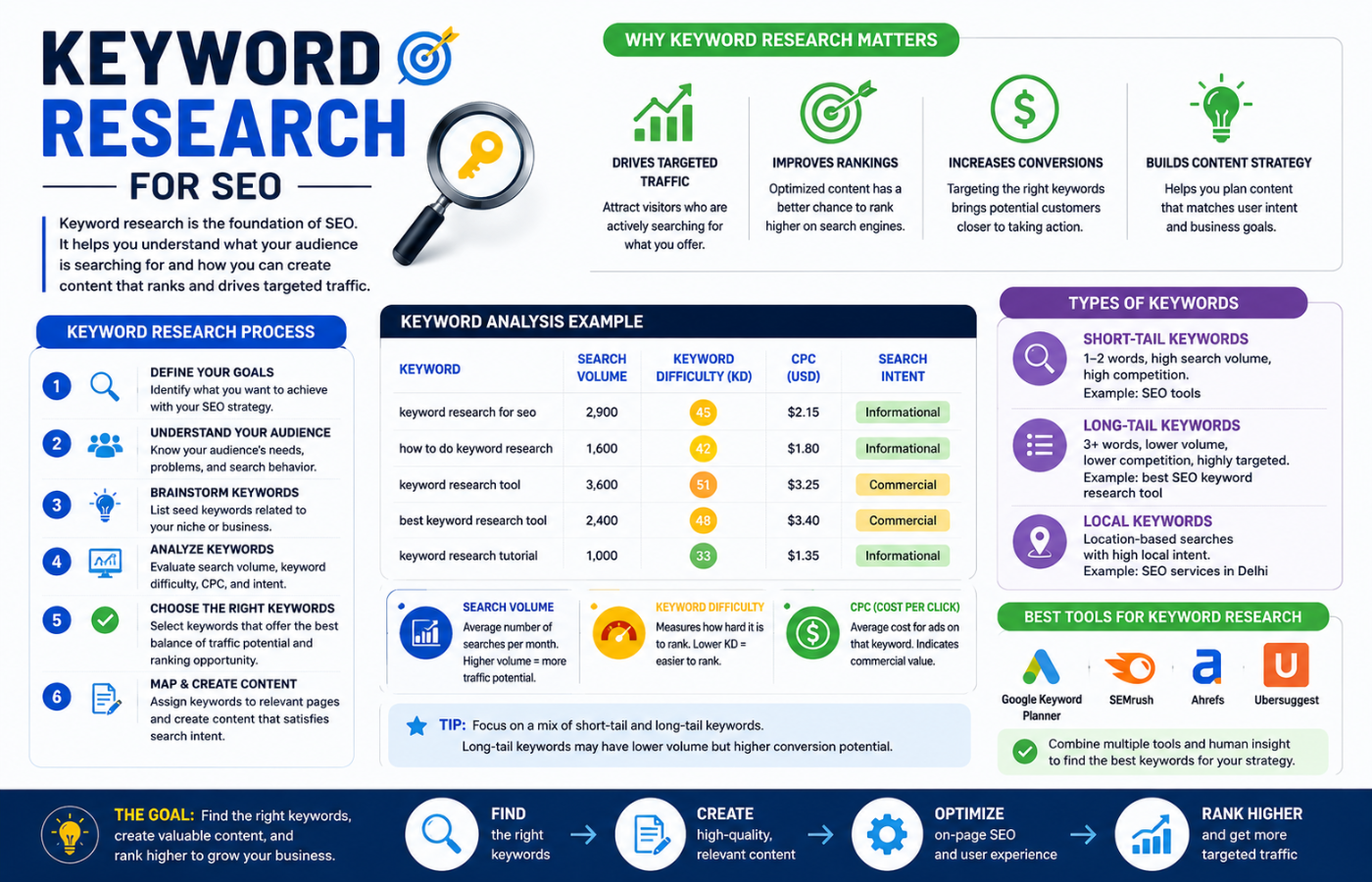
Keyword Research for SEO: Step-by-Step Guide for Beginners
Why Keyword Research Matters
Imagine writing a brilliant blog post that nobody ever reads because you targeted a term nobody searches for. That is what happens without proper keyword research. Keyword research ensures you are creating content that matches real user demand, giving your pages the best possible chance to rank.
Step-by-Step Keyword Research for SEO Beginners
Follow these steps to master keyword research for SEO:
Step 1: Start With Seed Keywords
These are the broad topics that describe your business, products, or services. They are your starting point.
How to generate seed keywords:
-
What do you sell? (e.g., “project management software”)
-
What problems do you solve? (e.g., “track team tasks”)
-
What do your customers call your service? (e.g., “task management tool”)
Tip: Ask your customers what terms they would use to find you. Their language might differ from yours.
Step 2: Expand Your List With Research Tools
Use free and paid tools to find related keywords:
| Tool | Best For | Free Version |
|---|---|---|
| Google Keyword Planner | Search volume, competition | Yes (with Google Ads) |
| Google Autocomplete | Real-time suggestions | Free |
| AnswerThePublic | Question-based keywords | Free (limited) |
| Ubersuggest | Keyword ideas + difficulty | Free (limited) |
| Semrush | Competitor keyword analysis | Free trial |
| Ahrefs | Deep keyword data | Free trial |
How to use them: Enter your seed keywords and export the suggestions.
Step 3: Analyse Search Intent
Not all searches are the same. Group keywords by what the user actually wants:
| Intent Type | Example | Content Type |
|---|---|---|
| Informational | “What is project management?” | Blog post, guide, FAQ |
| Navigational | “Asana login” | Brand page, login portal |
| Commercial | “Asana vs Trello” | Comparison guide, case study |
| Transactional | “Buy project management software” | Product page, pricing, free trial |
Why it matters: A user searching “best CRM for small business” is ready to compare. A user searching “what is CRM” is still learning. Match your content to their intent.
Step 4: Filter for Relevance and Opportunity
Not every keyword is worth targeting. Apply these filters:
Relevance Check:
-
Does this keyword directly relate to what you offer?
-
Would a visitor searching this term be interested in your product?
Search Volume Check:
-
Is there enough monthly search volume to justify the effort?
-
(For beginners, 100-1,000 searches per month is a good range)
Keyword Difficulty Check:
-
Can you realistically rank for this term?
-
(Start with low-difficulty keywords as a beginner)
Step 5: Check the “People Also Ask” Box
Google’s “People Also Ask” section is a goldmine for long-tail keyword ideas. Each expanded question reveals what real users are curious about.
Example for “plumber”:
-
“How much does a plumber cost?”
-
“When should I call an emergency plumber?”
-
“What does a plumber do for a boiler?”
These questions make excellent blog post topics.
Step 6: Spy on Your Competitors
Your competitors have already done some research. Use SEO tools to see which keywords they rank for.
What to look for:
-
Keywords they rank for that you do not (opportunity)
-
Keywords they rank poorly for (easier to outrank)
-
Content gaps they have not covered (write better content)
Step 7: Group Keywords Into Topics (Clusters)
One keyword per page is outdated. Group related keywords into “clusters” around a central “pillar” topic.
Example Cluster:
-
Pillar: “Complete Guide to Email Marketing”
-
Cluster keywords: “Email automation tools,” “How to write subject lines,” “Welcome email templates,” “Abandoned cart recovery”
Each cluster becomes a separate blog post, all linking back to the pillar page. This structure signals authority to Google.
Step 8: Prioritise Your Keywords
You cannot target everything at once. Prioritise using this scoring system:
| Factor | Weight | Score (1-5) |
|---|---|---|
| Search volume | 1-5 | ____ |
| Keyword difficulty | 1-5 (lower is better) | ____ |
| Commercial intent | 1-5 (higher is better) | ____ |
| Relevance to your product | 1-5 | ____ |
| Total Score | ____ |
Start with the highest-scoring keywords first.
Step 9: Map Keywords to Content Types
| Keyword Type | Best Content Format |
|---|---|
| “How to…” (informational) | Blog post, tutorial, video |
| “Best…” (commercial) | Comparison guide, listicle |
| “Buy…” (transactional) | Product page, pricing page |
| “What is…” (informational) | Explainer, FAQ page |
Step 10: Monitor and Refresh Monthly
Keywords change. New questions emerge. Search volume shifts. Schedule a monthly keyword review to:
-
Check rankings for your target keywords
-
Find new keyword opportunities
-
Identify content gaps
-
Update older posts with fresh keywords
Common Keyword Research Mistakes for Beginners
| Mistake | Why It Hurts | Fix |
|---|---|---|
| Targeting only high-volume keywords | Too competitive, impossible to rank | Mix head terms with long-tail |
| Ignoring search intent | High traffic, zero conversions | Match content type to intent |
| No keyword grouping | Pages cannibalise each other | Assign one primary keyword per page |
| Forgetting local keywords | Missing local customers | Add city/neighbourhood to keywords |
| Set and forget | Keywords change over time | Update keyword research quarterly |
| Choosing irrelevant keywords | Wrong audience visits your site | Only target keywords related to what you sell |
Recommended Tools for Beginners
| Tool | What It Does | Free Option |
|---|---|---|
| Google Keyword Planner | Search volume, competition data | Yes |
| Google Autocomplete | Real-time keyword suggestions | Free |
| AnswerThePublic | Question-based keywords | Free (limited) |
| Ubersuggest | Keyword ideas, difficulty, volume | Free (limited) |
| Keyword Surfer | Chrome extension shows search volume | Free |
| AlsoAsked | Visualises “People Also Ask” | Free (limited) |
Measuring Keyword Research Success

Track these metrics monthly:
-
Keyword rankings: Are your target keywords moving up?
-
Organic traffic: Are more visitors coming from search?
-
Click-through rate (CTR): Are searchers clicking your result?
-
Conversion rate: Are visitors taking the desired action?
-
Keyword coverage: How many of your target keywords are you ranking for?
Conclusion: Research First, Write Second
Writing content without keyword research is like setting sail without a map. You might get lucky, but you are far more likely to waste time and effort on content nobody reads. The keyword research for SEO process outlined here — starting with seed keywords, expanding with tools, analysing intent, filtering for relevance, grouping into clusters, and prioritising — gives you a clear, data-driven roadmap for creating content that actually performs. As search continues to evolve, mastering keyword research remains a fundamental part of the future of SEO, helping businesses create content that aligns with both user needs and search engine expectations.
Want keyword research that uncovers exactly what your customers are searching for — so you can create content that ranks and converts?
Get in touch with Orbitix today.