




10 Things to Look for When Hiring Website Designers for Small Business
Hiring the right website designers for small business can be the difference between a website that drives leads and one that collects digital dust. Small business owners face unique challenges: limited budgets, no internal IT team, and the need for a site that actually generates phone calls and enquiries. The best website designers for small business understand these constraints and build affordable, conversion-focused websites that compete with much larger competitors. They also ensure the site is built on a solid foundation by addressing common technical SEO issues that can affect search visibility and user experience. But how do you separate the professionals from the amateurs? This checklist gives you ten specific things to look for before signing any contract.
Why Small Business Websites Need Specialised Designers
A designer who builds $50,000 enterprise sites will over-deliver (and overcharge). A bargain-basement freelancer might leave you with a broken, unrankable mess. Small business owners need the sweet spot: professional design that is affordable, maintainable, and focused on lead generation — not flashy animations that slow down your site.
10 Things to Look for in Website Designers for Small Business
Here is what to evaluate when vetting website designers for small business:
1. They Ask About Your Goals, Not Just Your Look
A good designer asks: “What action do you want visitors to take? Phone calls? Contact forms? Online bookings?” If they only talk about colours and fonts, walk away.
Red flag: “I need to know your favourite colour palette.”
Green flag: “How many leads do you need per month, and what’s your current conversion rate?”
2. They Offer Mobile-First Design (Not Mobile-Friendly)
Over 60% of small business traffic comes from smartphones. “Mobile-friendly” means your site technically works on phones. “Mobile-first” means it was designed for thumbs, one-handed use, and patchy 4G.
What to ask: “Can I see three mobile-first sites you have built for local businesses?”
3. They Include SEO Basics in the Package
A beautiful site that nobody finds is useless. Your designer should include:
-
Optimised page titles and meta descriptions
-
Proper heading structure (one H1 per page, logical H2s)
-
Image alt text
-
XML sitemap submission
-
Google Search Console and Analytics setup
Red flag: “SEO is extra. That’s a separate service.”
4. They Use a CMS You Can Manage
You should not need a developer to change a phone number or add a blog post. Good designers use WordPress, Webflow, or Squarespace (for very simple sites) and train you how to make basic edits.
What to ask: “Show me how I would update my hours or add a new service.”
5. They Build for Speed (Core Web Vitals)
Google penalises slow websites. Your designer should guarantee:
-
Largest Contentful Paint (LCP) under 2.5 seconds
-
Cumulative Layout Shift (CLS) under 0.1
-
Compressed images (WebP format)
-
Minimal plugins (no bloat)
Red flag: “Don’t worry about speed. Your hosting will handle it.”
6. They Have Small Business Portfolio Examples
Ask for case studies from businesses your size — not global brands. A designer who only shows Nike or Apple is hiding their real work.
What to ask: “Can you show me a site you built for a business with under 10 employees and a budget under £5,000?”
7. They Offer Ongoing Maintenance (Not Just Launch)
Websites break, plugins need updates, and security threats emerge. Your designer should offer monthly maintenance packages.
What to look for: £50-150 per month for backups, updates, security monitoring, and small content changes.
Red flag: “Once it’s live, it’s your responsibility.”
8. They Include Lead Capture Features
Your site must turn visitors into leads. Essential features include:
-
Contact forms that work (tested)
-
Click-to-call buttons on mobile
-
Appointment booking integration
-
Email newsletter signup
What to ask: “How do you handle form spam protection and lead notifications?”
9. They Provide Clear Pricing and Deliverables
Small business budgets are tight. Professional designers offer transparent packages:
-
What is included (number of pages, revisions, stock photos)
-
What is excluded (copywriting, logo design, hosting, ongoing support)
-
Timeline and payment schedule
Red flag: “I need a deposit before I can give you a quote.”
10. They Give You Ownership of Everything
After final payment, you should own:
-
The design files
-
The code
-
The domain (registered in your name, not theirs)
-
Hosting credentials (or ability to transfer)
Red flag: “You cannot move your site without paying a release fee.”
Small Business Website Designer Comparison Checklist
| Criteria | What to Look For | What to Avoid |
|---|---|---|
| Goal focus | Lead generation and calls | Only colour and font discussion |
| Mobile approach | Mobile-first design | “Mobile-friendly” as an afterthought |
| SEO inclusion | Meta tags, structure, sitemap | SEO as a paid extra |
| CMS training | You can make basic edits | You need developer for every change |
| Speed guarantee | Core Web Vitals targets met | “Speed is your hosting’s problem” |
| Portfolio | Small business case studies | Only big brands or no portfolio |
| Maintenance | Monthly plans offered | No post-launch support |
| Lead capture | Forms, click-to-call, booking | Generic contact page only |
| Pricing | Clear package breakdown | Vague quotes, no scope of work |
| Ownership | You own everything | Release fees, domain in their name |
Questions to Ask Before Hiring
-
“How many small business websites have you built in the last 12 months?”
-
“What is your process for understanding my customers, not just my brand?”
-
“Who writes the content — me or you?” (Clear answer saves surprises)
-
“How do you handle revisions?” (Number of rounds, process)
-
“What happens if I want to leave you?” (Transfer process, ownership)
Common Small Business Website Mistakes to Avoid
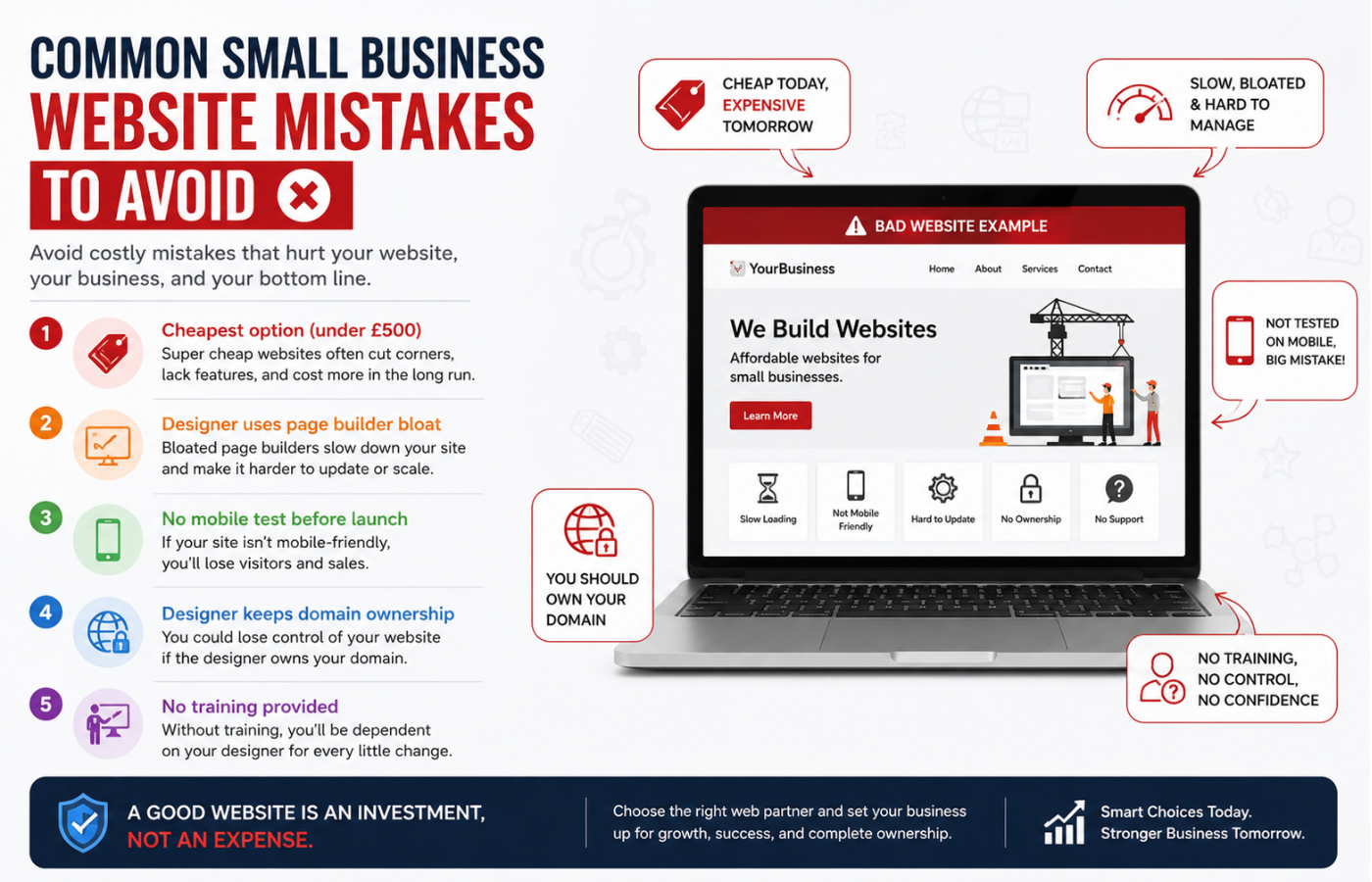
| Mistake | Why It Hurts | Fix |
|---|---|---|
| Cheapest option (under £500) | Broken code, no SEO, no support | Invest £2,000-7,000 for quality |
| Designer uses page builder bloat | Slow load times, mobile issues | Ask for lightweight theme (GeneratePress, Kadence) |
| No mobile test before launch | Lost mobile leads | Test on 3+ devices before paying final invoice |
| Designer keeps domain ownership | Hostage situation | Register domain in your name |
| No training provided | You cannot update anything | Require 1-hour training session |
Conclusion: Invest in the Right Partner
Your small business website is not an expense — it is a lead generation asset that works 24/7. The right website designers for small business build fast, mobile-first, SEO-ready sites that you can actually manage, with clear pricing and ongoing support. Many of the key elements that form the constitutes of a good website – such as speed, usability, mobile responsiveness, and strong SEO foundations—are often overlooked by inexperienced designers. Use this ten-point checklist to separate professionals from amateurs, and invest in a partner who cares about your phone ringing, not just your colour scheme.
Want website designers who build fast, lead-generating sites that you can actually manage — with transparent pricing and no hidden release fees?
Get in touch with Orbitix today.